Product data design
How a product and its data are set, in a brochure and in a presentation: the name, the article numbers, the packshots, the table, the fabric swatches, the feature tags and the certification label, each with its size, its typeface and the air around it.
The standard block
Measured from ID katalog 2027 NEWS, part by part, so the block can be built again exactly. Every length is in print points as measured, with millimetres and slide pixels worked out from it. Build from the numbers, not from the picture.
A value in braces, such as {number}, is a placeholder. The real value comes from the product data and is never invented.
One product on a page, with everything about it. The one to use unless there is a reason for another.
Read from the top: the name and the numbers, two packshot tiles side by side, the table in two columns under the tiles, the swatches, the tags, the label. Heights are from the top of the tiles, downwards; a baseline is where the letters stand. Sideways everything starts at the block's left edge unless a measure says otherwise. The whole block is 482.83 pt (170.33 mm) wide.
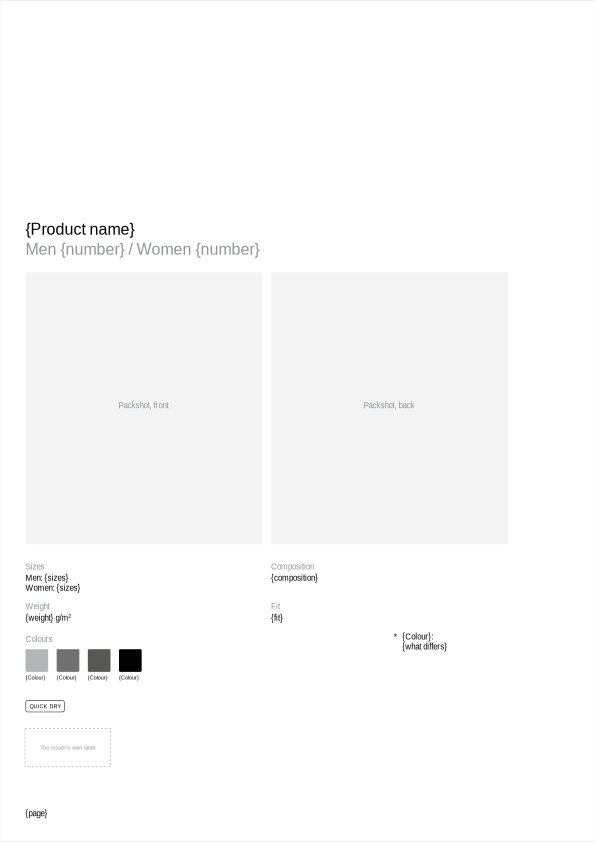
| Part | Measure | pt | mm | On a slide, px |
|---|---|---|---|---|
| Name | Baseline of the product name, above the top of the tiles | 37.46 | 13.22 | 93.65 |
| Name | Baseline of the article numbers, above the top of the tiles. One 20 pt line under the name | 17.46 | 6.16 | 43.65 |
| Packshots | Width of a packshot tile: four columns | 237.16 | 83.66 | 592.9 |
| Packshots | Height of a packshot tile. Also seen: 276.38 pt (97.5 mm) on seven blocks and 306.14 pt (108 mm) once, for a long garment. Both tiles of a product take the same height, and everything under them moves with it | 272.13 | 96 | 680.33 |
| Packshots | Between the two tiles: one gutter | 8.5 | 3 | 21.25 |
| Packshots | The packshot picture overlaps the tile's edge by this on every side and is clipped by it, so no line shows. Its own ground is Snow and the garment is whole | 1.1 | 0.39 | 2.75 |
| Table | Left edge of the table's second column, from the block's left edge: the left edge of the second tile | 245.67 | 86.67 | 614.17 |
| Table | Baseline of the first labels (Sizes, Composition), below the bottom of the tiles | 25.21 | 8.89 | 63.03 |
| Table | From a label's baseline to the baseline of its first value line | 11.42 | 4.03 | 28.55 |
| Table | From one value line to the next | 10 | 3.53 | 25 |
| Table | From the last value baseline of a row, in the column that runs longest, to the labels of the next row (Weight, Fit). The two labels of a row always share a baseline | 18.5 | 6.53 | 46.25 |
| Colours | From the last value baseline of the table to the baseline of the label Colours | 21.33 | 7.52 | 53.32 |
| Colours | From the baseline of the label Colours to the top of the swatches | 7.09 | 2.5 | 17.73 |
| Colours | A swatch: a square of fabric | 22.68 | 8 | 56.7 |
| Colours | Corner radius of a swatch | 1.13 | 0.4 | 2.82 |
| Colours | Between two swatches. One swatch and its gap is 31.18 pt (11 mm); up to ten stand in a row | 8.5 | 3 | 21.25 |
| Colours | The fabric picture overlaps the swatch's edge by this on every side and is clipped by its rounded corners. Snow lies under it | 1.05 | 0.37 | 2.63 |
| Colours | Baseline of the colour name, below the bottom of its swatch. Left edge on the swatch's left edge | 7.76 | 2.74 | 19.4 |
| Colours | From the first line of a colour name to its second | 6 | 2.12 | 15 |
| Feature tags | Top of the feature tags, below the bottom of the swatches. Also seen: 29.92 pt | 28.58 | 10.08 | 71.45 |
| Feature tags | Height of a tag | 11.55 | 4.07 | 28.88 |
| Feature tags | Corner radius of a tag | 1.7 | 0.6 | 4.25 |
| Feature tags | The tag's outline, in Ink, with no fill | 0.5 | 0.18 | 1.25 |
| Feature tags | From the tag's edge to its text, on each side: a tag is as wide as its text plus twice this | 3.65 | 1.29 | 9.13 |
| Feature tags | Baseline of the tag's text, below the top of the tag | 7.78 | 2.74 | 19.45 |
| Feature tags | Between two tags | 2.5 | 0.88 | 6.25 |
| Certification label | Top of the certification label, below the bottom of the swatches, when there are no tags. Seen from 28.25 to 30.71 pt | 28.25 | 9.97 | 70.63 |
| Certification label | 16.55 | 5.84 | 41.38 | |
| Certification label | Width of the round mark in the label as it stands in the catalogue: the label is the issuer's artwork, scaled as a whole. With its text the label is about 85.5 pt (30.2 mm) wide | 37.84 | 13.35 | 94.6 |
| Certification label | A second label stands this far to the right of the first: two columns | 122.84 | 43.34 | 307.1 |
| Footnotes | Left edge of the footnotes, from the block's left edge: the block's last two columns | 368.51 | 130 | 921.27 |
| Footnotes | From the asterisk to the note's text. Every line of the note starts here | 8.5 | 3 | 21.25 |
| Footnotes | From one line of a note to the next | 10 | 3.53 | 25 |
| Footnotes | From the last line of a note to the asterisk of the next | 12.83 | 4.53 | 32.08 |
- The label may stand in the table's second column instead, its top level with the top of the swatches, when the colours leave room.
- The footnotes have no fixed height: they stand beside the colours, from about the label Colours and down.
- The label's left edge stands 0.5 pt left of the block's edge, so the round mark lines up by eye.
Rules
| Rule | From |
|---|---|
| Build every product in one order: name, article numbers, packshots, table, colours, feature tags, certification label, footnotes. Leave a part out only when the product has nothing for it; never move one. | Measured in the 2027 NEWS catalogue |
| Use three sizes of text and no others: 16/20 pt for the name and the numbers, 8/10 pt for the data, 5.5/6 pt for colour names and feature tags. All Momo Trust Sans Regular. | Measured in the 2027 NEWS catalogue |
| Set the name and every value in Ink, and the article numbers and the table's labels in 50 % K. Nothing else is grey and nothing takes a colour. | Measured in the 2027 NEWS catalogue |
| Put each label over its value, never beside it: 'Sizes' in 50 % K, then the sizes in Ink 11.42 pt below. | Measured in the 2027 NEWS catalogue |
| Set the table in two columns that start on the left edges of the two tiles: Sizes beside Composition, Weight beside Fit, then Colours across. The two labels of a row share a baseline even when one value runs to more lines. | Measured in the 2027 NEWS catalogue |
| Show a colour as a picture of the real fabric in an 8 mm square with rounded corners, never as a flat colour from a screen, with its name under it in Ink. | Measured in the 2027 NEWS catalogue |
| Put every packshot on Snow, whole and uncropped. The tile is Snow too, so its edge does not show. | The design system's own rule |
| Show a feature only as an outlined tag in capitals, and only a feature the product data names. | Measured in the 2027 NEWS catalogue |
| Show a certification only as the issuer's own label with the product's own certificate number. | The design system's own rule |
| Never invent or round a product fact. Every name, number, size, composition, weight, colour name, feature and certificate comes from the product data, written as it is there. | The design system's own rule |
| Start every tile, table column, row of swatches and footnote on a column of the page. Do not nudge one by eye. | Measured in the 2027 NEWS catalogue |
| Keep the distances as measured. When a value takes more lines, the parts under it move down by 10 pt a line; nothing is squeezed and no text is made smaller to fit. | Measured in the 2027 NEWS catalogue |
The fields
The same fields in the same order, in print and on slides. A field that is not needed is left out when the product has nothing for it.
| Field | Needed | How it is written |
|---|---|---|
| Product name | Yes | As the product data has it, the parts separated by commas: '{Product}, {Variant}'. |
| Article numbers | Yes | Who it is for, then the number, with ' / ' between two: 'Men {number} / Women {number}', 'Men {number}', 'Unisex {number}', 'Children {number}'. |
| Packshots | Yes | Two per product, side by side: front and back, or the men's and the women's. Uncropped, on Snow. |
| Sizes | Yes | One line for each article: 'Men: S - 4XL', 'Women: S - 4XL'. A hyphen with a space on each side. |
| Composition | Yes | The fibres as the product data has them, a ' /' at the end of a line that goes on: '77% cotton, organic /' then '23% polyester, recycled'. |
| Weight | Yes | '{weight} g/m2' with the 2 as a superscript, a range as '90 - 110 g/m2'. |
| Fit | Yes | One word from the product data, such as 'Regular'. |
| Colours | Yes | One fabric swatch for each colour, in the product data's order, with the colour's name under it. Two words may break into two lines. |
| Feature tags | If the product has it | Only features the product data names, in capitals, one outlined tag each: 'QUICK DRY'. |
| Certification label | If the product has it | The issuer's own label with the product's own certificate number. Never drawn, copied or guessed. |
| Footnotes | If the product has it | An exception to a value, marked with an asterisk after the value and before the note: '*' then '{Colour}: {what differs}'. |
Text and colour
| Text | Print style | Typeface | Size/line, pt | Colour | On a slide | Use |
|---|---|---|---|---|---|---|
| Product name | Body (md) | Momo Trust Sans Regular | 16/20 | Ink | Slides/Body/lg | The product name, and the article numbers on the line under it in 50 % K. |
| Product data | Body (xs) | Momo Trust Sans Regular | 8/10 | Ink | Slides/Body/md | The table's labels (50 % K) and values (Ink), the footnotes, and the name and numbers in an overview. |
| Swatch and tag text | 5.5 pt, outside the six print styles | Momo Trust Sans Regular | 5.5/6 | Ink | Not decided | The colour name under a swatch, and a feature tag in capitals. |
| Superscript 2 | Superscript of Body (xs) | Momo Trust Sans Regular | 4.66/10 | Ink | Superscript of Slides/Body/md | The 2 in g/m2: 58.3 % of the text size, raised a third of it (2.67 pt at 8 pt). Never the glyph for squared. |
| Colour | In print, CMYK | On a screen and a slide | Use |
|---|---|---|---|
| Ink | 0 0 0 100 (K only) | text/default (neutral/900) | The product name, every value, the colour names, the feature tags and their outline, the footnotes. |
| 50 % K | 0 0 0 50 | text/muted (neutral/600) | The article numbers under the name and the labels of the table: Sizes, Composition, Weight, Fit, Colours. On a screen 50 % K is too weak for small text, so the system's muted text stands in: our mapping, not Peter's. |
| Snow | 0 0 0 6 | neutral/50 | The packshot tiles and the ground under a fabric swatch. |
The page
A4 with 9 mm margins and nine columns of 18.67 mm with 3 mm between them, so one column and its gutter is 21.67 mm. Every tile, table column and footnote in the block starts on a column. The standard block is eight columns wide: on a left page it starts at column 1, on a right page at column 2, so the free column is at the spine.
| Measure | pt | mm |
|---|---|---|
| Page width | 595.28 | 210 |
| Page height | 841.89 | 297 |
| Margin | 25.51 | 9 |
| Column | 52.91 | 18.67 |
| Between columns | 8.5 | 3 |
| A column and its gutter | 61.42 | 21.67 |
| First baseline of the intro paragraph, from the top trim. Body (md), 16/20, at the left margin | 41.91 | 14.78 |
| First baseline of a headline, from the top trim. Display 48 pt on 48 pt lines | 66.21 | 23.36 |
| Baseline of the product name on a standard product page, from the top trim | 234.67 | 82.79 |
| Top of the packshot tiles on a standard product page, from the top trim | 272.13 | 96 |
| Left edge of the block on a left page, from the page's left trim (column 1) | 25.51 | 9 |
| Left edge of the block on a right page, from that page's left trim (column 2) | 86.93 | 30.67 |
| Baseline of the page number, from the top trim. Body (xs), at the outer margin | 816.38 | 288 |
The rest of the brochure's rules are under Brochure Planner.
Compact block
Two products on a page: one packshot tile with the data beside it. The arrangement that also fits a slide.
The name and the numbers stand over one tile, as in the standard block. The table, the swatches, the label and the footnotes move up beside the tile, at column 5 and column 7. The second block starts 428.03 pt below the first. The whole block is 544.26 pt (192 mm) wide.
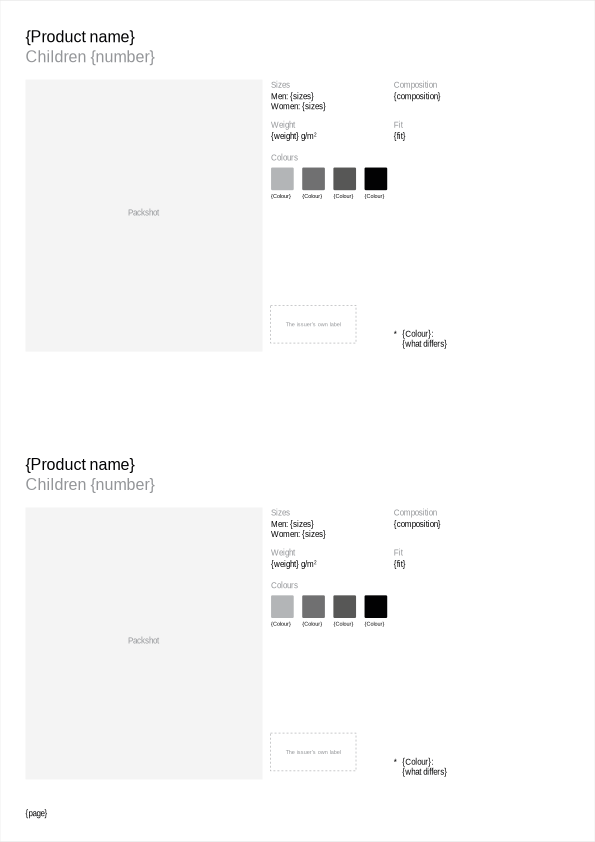
| Part | Measure | pt | mm | On a slide, px |
|---|---|---|---|---|
| Name | Baseline of the product name, above the top of the tile: the same as in the standard block | 37.46 | 13.22 | 93.65 |
| Packshot | Width of the one tile: four columns | 237.16 | 83.66 | 592.9 |
| Packshot | Height of the tile | 272.13 | 96 | 680.33 |
| Table | Left edge of the table's first column, from the block's left edge: column 5. The swatches and the label start here too | 245.67 | 86.67 | 614.17 |
| Table | Left edge of the table's second column, from the block's left edge: column 7. The footnotes start here too | 368.51 | 130 | 921.27 |
| Table | Baseline of the first labels, below the top of the tile. The rest of the table, the colours and the swatches follow with the standard block's measures | 8.2 | 2.89 | 20.5 |
| Certification label | Bottom of the certification label, above the bottom of the tile | 8.53 | 3.01 | 21.32 |
| Footnotes | Last baseline of the footnotes, above the bottom of the tile. Seen from 1.78 to 4.72 pt | 4.72 | 1.67 | 11.8 |
| Page | From the name of one block to the name of the next. The first name stands on the top margin's first baseline, 41.91 pt from the trim | 428.03 | 151 | 1070.07 |
Overview
Many products at a glance: only the name, the numbers and the two packshots. Up to six products on a page.
Each product takes four columns: two small tiles side by side with the name and the numbers over them, both in Body (xs). Two products stand side by side, at column 1 and column 5, in three rows. The whole block is 482.83 pt (170.33 mm) wide.
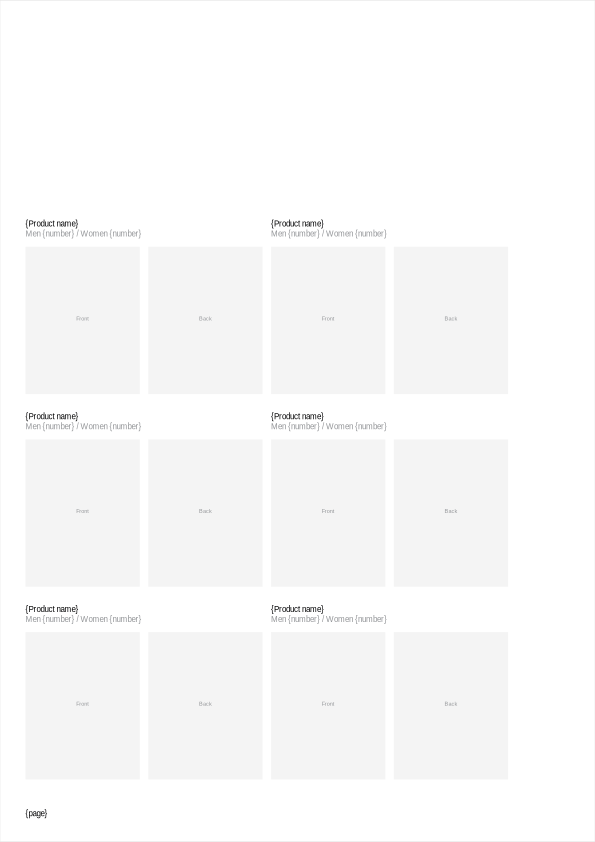
| Part | Measure | pt | mm | On a slide, px |
|---|---|---|---|---|
| Packshots | Width of a small tile: two columns | 114.33 | 40.33 | 285.82 |
| Packshots | Height of a small tile | 147.4 | 52 | 368.5 |
| Packshots | Between the two tiles of a product, and between two products: one gutter | 8.5 | 3 | 21.25 |
| Name | Baseline of the product name, above the top of the tiles. Body (xs), Ink | 20.14 | 7.1 | 50.35 |
| Name | Baseline of the article numbers, above the top of the tiles. Body (xs), 50 % K | 10.14 | 3.58 | 25.35 |
| Page | From the left edge of one product to the next: four columns | 245.67 | 86.67 | 614.17 |
| Page | From one row of products to the next. From the bottom of a tile to the name under it that is 25.22 pt, the same as from a tile to the table | 192.76 | 68 | 481.9 |
| Page | Top of the first row of tiles, from the top trim | 246.61 | 87 | 616.53 |
On a slide
On a slide a product is shown the way Peter drew it in ID® PowerPoint Masters: the packshot on Snow with the article number and the name on one line under it, three or twelve to a slide. That is all that is drawn. The print block is 483 by about 550 pt: scaled to slide text it is higher than a slide, so it cannot be put on a slide as it is. What fits is the compact block: one tile with the data beside it.
| Drawn by Peter | How the product stands |
|---|---|
| 3 Products | Tile 587 by 633 px, three across from x 40 with 40 px between. Under each, 20 px below, one line in Slides/Body/lg: '{number} {name}'. |
| 12 Products | Tile 273 by 294 px, six across in two rows. Under each, 10 px below, one line in Slides/Body/md: '{number} {name}'. |
The same in print and on a slide
- The same fields in the same order, written the same way.
- The packshot on Snow, whole and uncropped.
- The name in Ink; what steps back in the muted grey.
- A colour as a picture of the fabric with its name; a feature as a tag; a certification as the issuer's label.
- Never an invented product fact.
What differs
- On a slide the article number and the name stand on one line under the packshot, number first. In print the name stands over the packshots and the numbers on the line under it.
- On a slide text is Momo Trust Sans Medium in the six slide styles. In print it is Regular.
- A slide has room for less. Show the full data of one product only; for more products use Peter's two layouts and leave the data out.
The scale
One point in print is 2.5 pixels on a 1920 by 1080 slide, which is 1.25 pt in PowerPoint. The scale is read from Peter's own drawings, not chosen: the data text of 8 pt becomes 20 px, exactly Slides/Body/md; the tile of 237.16 by 272.13 pt becomes 593 by 680 px, where Peter's large product tile is 587 by 633 px; the name of 16 pt becomes 40 px, where Peter's Slides/Body/lg is 36 px.
The full data on a slide
A proposal by scale, not drawn by Peter. Use it for a draft and say that it is a proposal. It does not go in the template before Peter has drawn it.
Take the compact block and multiply every print measure by 2.5 to get slide pixels. Put the tile at Peter's place for the first product, x 40 and y 240. Set the name and the numbers in Slides/Body/lg and the table and the footnotes in Slides/Body/md, in Ink and the muted grey. The swatches become 56.7 px with 21.25 px between them.
The colour names and the feature tags are the open point: at this scale they are 13.75 px, which is under the smallest slide style (Slides/Body/md, 20 px), and they do not fit under the swatches at 20 px. Until Peter decides, set them at 13.75 px in a draft, or leave the names out and say so.
Not decided yet
- The tiles are 96 mm high on five blocks and 97.5 mm on seven. Which is the standard?
- The catalogue's grid has 3 mm between the columns (8.5 pt). The brochure rule says 6 pt. Which one holds?
- The 5.5 pt text under swatches and in tags is outside the six print styles. Should it be a style of its own, Body (2xs)?
- The certification label and the feature tags stand between 28 and 31 pt under the swatches. Is 10 mm the intended distance?
- Slides: Peter has drawn the packshot with number and name. Will Peter draw one slide with the full product data (table, swatches, tags, label), and how small may the text be?
- Slides and screen: 50 % K is too weak for small text on a screen. Is the muted text colour (neutral/600) the right stand-in?
Read from
The finished news catalogue, measured from its print PDF (InDesign, spreads of two A4 pages, PDF made 11 November 2026) on 25 November 2026: every text, fill and picture frame on the fourteen product blocks, the overview page and the compact page. The file is not published here.
The same as text, for an agent: /product-data.md